---
title: Tabs for query builder
source: https://docs.newrelic.com/whats-new/2024/05/whats-new-05-16-query-tabs
---
Interacting with multiple queries just got easier! We've added tabs to the new query builder, allowing you to explore data, build queries, and troubleshoot more efficiently.
Combine the power of the new querying UI with tabs to easily navigate the New Relic platform and uncover data insights without losing context.
The new tabbed query builder streamlines your querying experience so you can get more insights without sacrificing speed. Exciting improvements include:
- **No more lost queries**. Explore the platform without the fear of overwriting the queries you've built.
- **No more browser tab switching**. Keep multiple queries in one easy-to-navigate window.
- **Tab management made easy**. Organize your insights by naming your tabs.
- **Faster loading**. Switching between queries is snappier than ever thanks to improved caching.
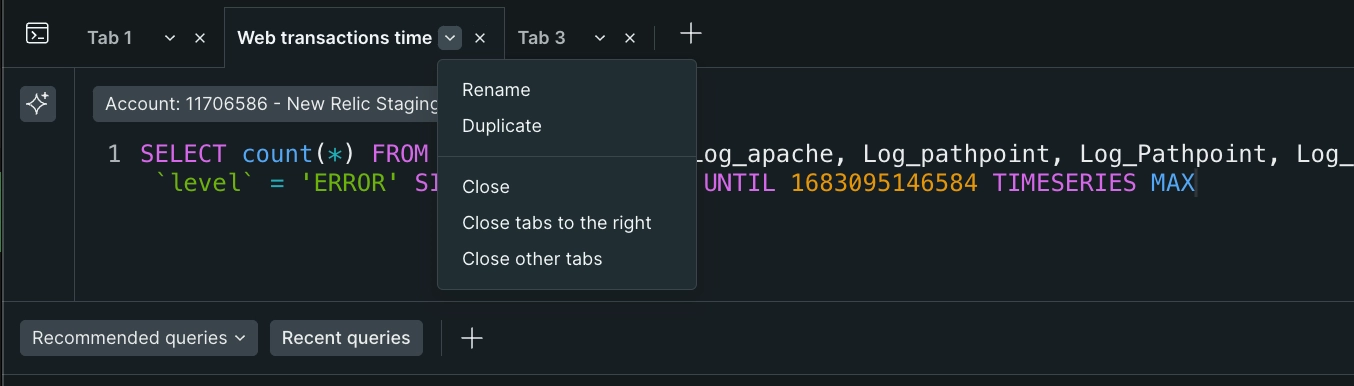
Click on the ⌄ icon beside your tab name to quickly organize your tabs.
## Get started
To get query tabs, you'll need to update to the [new querying interface](https://docs.newrelic.com/whats-new/2024/02/whats-new-02-21-new-query-experience/). It provides an expandable persistent query which lets you query your data in context, even if you don't know how to use [NRQL](https://docs.newrelic.com/docs/nrql/get-started/introduction-nrql-new-relics-query-language/).
Go to the [query your data](https://one.newrelic.com/data-exploration) capability and select the **Try it out** button in the banner.