---
title: Enhance your dashboards with new customization features
source: https://docs.newrelic.com/whats-new/2022/11/whats-new-11-21-dashboard-chart-customizations
---
# New chart customization options
New Relic dashboards let you analyze telemetry data across your entire stack, regardless of the source. Dashboards are a flexible way for engineering teams to visualize data however they want by combining pre-made templates, native platform visualizations, custom queries, and more—all in one place.
Now there are more ways to upgrade your dashboards, including:
- **Markdown widget:** Add rich custom content to your dashboards such as links, checklists, tables, and text formatting.
- **Custom colors:** Highlight key information or choose a preferred color palette for each data series.
- **Null value options:** Four options to display, transform, or remove null points.
- **Unit labels:** Increase chart detail and clarity with custom units per series.
- **Override time picker:** Analyze different time ranges in a single dashboard.
## See it in action
Check out the video below to see an interactive demo:
See some use cases and how to make the most of the Markdown widget:
## Try it yourself with the template dashboard
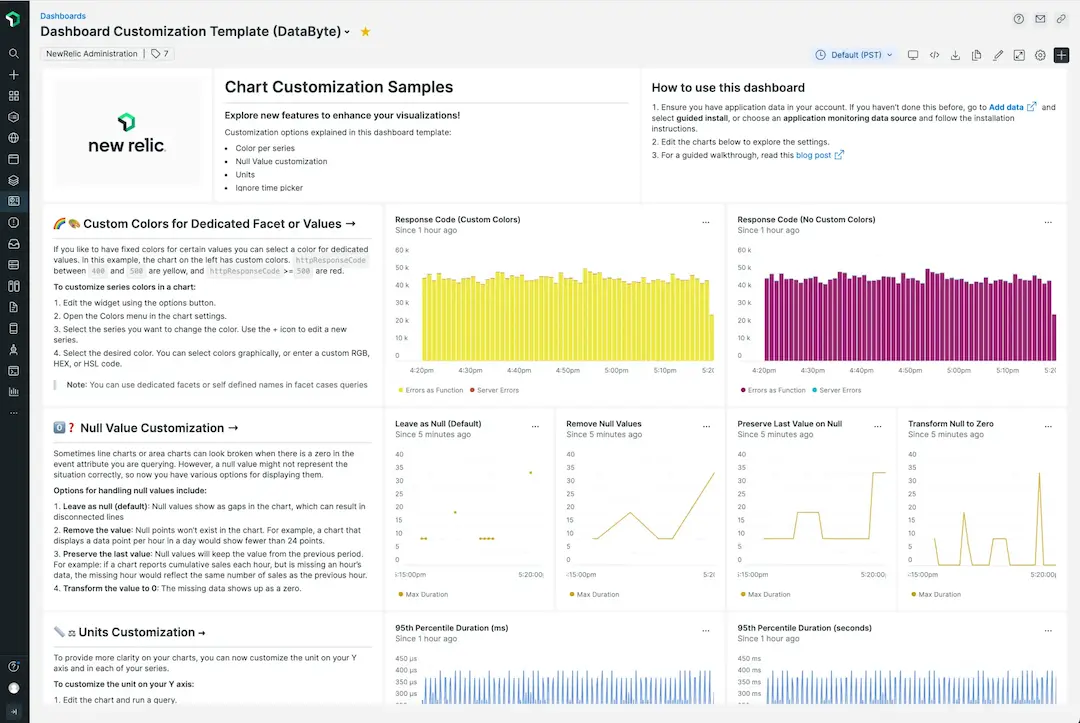
Import the sample dashboard to test out the new customization options.
You can explore the customization options by following the steps in this [hands-on blog](https://newrelic.com/blog/how-to-relic/dashboard-chart-customizations). It shows shows you how to import the pre-made template dashboard, describes each option, and demonstrates how to use them in your own charts.