Overview
The playback timeline page provides detailed information about a specific user viewing session for a specific entity, including golden metrics, metadata, and a complete timeline of streaming events. This page helps you understand exactly what happened during a user's viewing session within your application and troubleshoot playback issues.
What you can do with playback timeline
Use this page to:
- View session-level golden metrics including start time, buffer time, average bitrate, and errors
- Access the unique Session ID that identifies the specific viewing session
- Review entity information, platform details, and session metadata
- Monitor session length and total duration of the viewing session
- Analyze bitrate shifts that occurred during playback
- View a complete timeline of streaming events from PLAYER_READY to CONTENT_END
- Track buffering events (CONTENT_BUFFER_START and CONTENT_BUFFER_END)
- Identify pause and resume events during the session
- Monitor content heartbeat events sent every 30 seconds during playback
- Diagnose errors that occurred during the session with detailed event information
Who uses this page
This page is useful for application developers troubleshooting issues within their app, customer support teams resolving user complaints about specific viewing sessions, and quality assurance engineers investigating playback problems by examining the complete event timeline.
Session details
This page provides the details associated with a user session depending on a specific entity:
UI | Description |
|---|---|
Session ID | A unique ID that is generated every time any app starts. |
Entity | Information about the entity. |
Platform | Which is the platform that the end user is using to view the content. |
View all Metadata | View all the metadata associated with the session. |
Session length | Total Duration |
Start time | Time before first frame |
Buffer time | Total time spent buffering |
Average bitrate | Quality by bits played |
Bitrate shift | Total shifts in bitrate |
Errors | Number of error events |
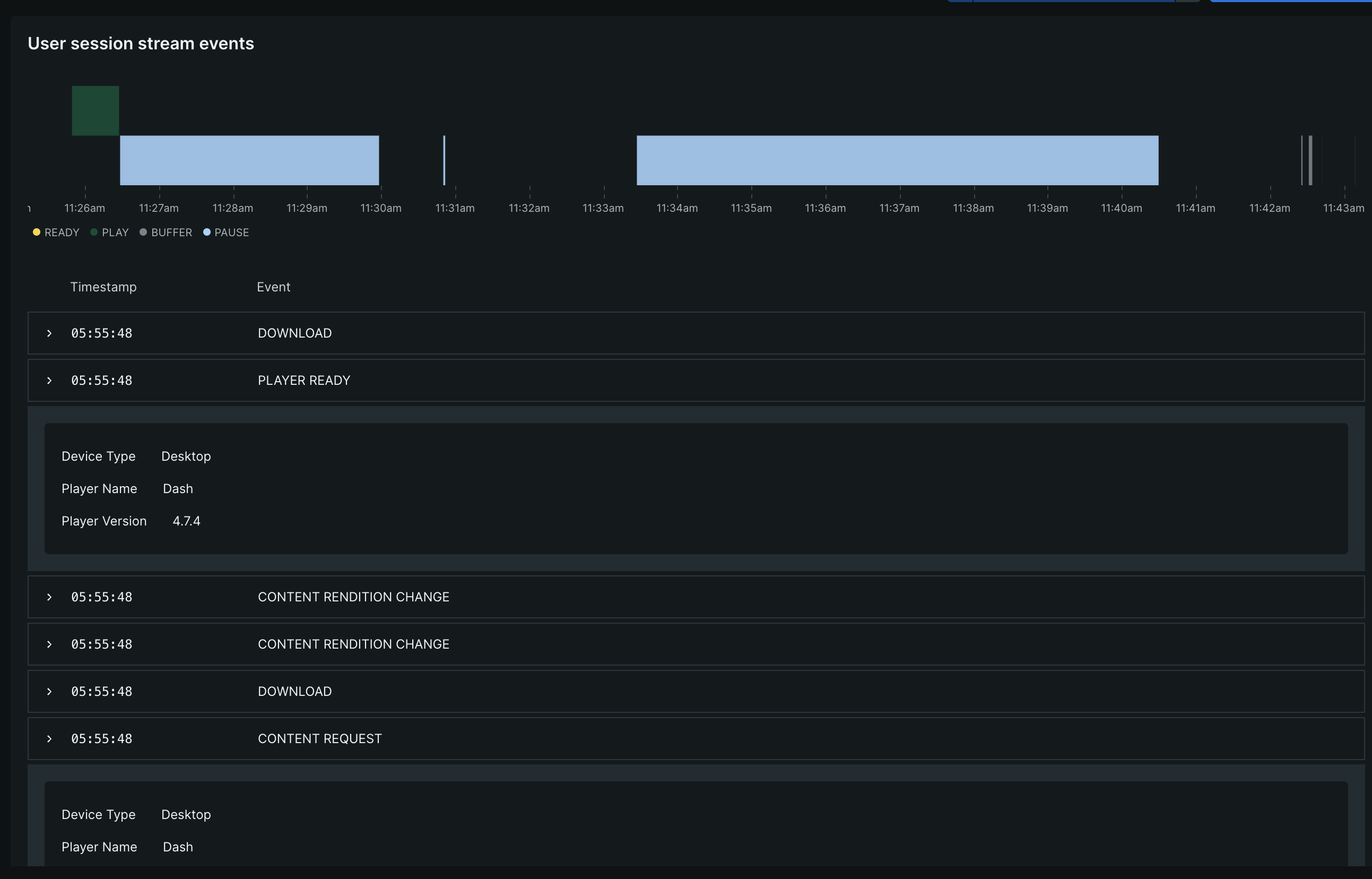
User session stream events
The user session streaming events are the events that are generated during the session. These events are used to track the user's behavior during the session.
A graph is displayed on the user session page that shows the events that are generated during the session and a detailed information about the event such as:
Event | Description |
|---|---|
PLAYER_READY | Player is ready to start working. It happens when the video agent is started. |
CONTENT_REQUEST | "Play" button pressed or autoplay activated. |
CONTENT_START | Video just started playing. |
CONTENT_END | Video ended playing. |
CONTENT_PAUSE | Video paused. |
CONTENT_RESUME | Video resumed. |
CONTENT_BUFFER_START | Video started buffering. |
CONTENT_BUFFER_END | Video ended buffering. |
CONTENT_ERROR | Video error happened. |
CONTENT_HEARTBEAT | Sent every 30 seconds between video start and video end. |